- Published 16 Sep, 2026
- Updated 16 Sep, 2026
- read
- Karolinehc
- Reviewed by: Karolinehc
- Editor: Karolinehc
Categories: Email Marketing Freelancing Marketing Analytics
Tags: Cold Outreach DNS Setup Email Authentication Email Deliverability Email Marketing Freelancer Tips Namecheap SPF DKIM DMARC Zoho Campaigns A/B Testing
Introduction
I recently launched an email marketing campaign to promote a project. What I thought would be a simple process turned into a weeks-long journey through domain registration, DNS authentication, and email deliverability challenges.
This article documents my experience — the wins, the frustrations, and the lessons I learned that will help other freelancers avoid the same mistakes.
Note: This article reflects my personal experience with one specific campaign. Zoho Campaigns is a legitimate, widely-used platform. The deliverability challenges I faced were related to my new domain and cold-list outreach, not to Zoho itself. Always test your own setup before making decisions.
The Goal
I wanted to send a professional email campaign to 99 potential clients, offering services for an ongoing project in Latin America.
Simple, right? Not quite.
What followed was a two-week crash course in:
- Domain registration
- DNS authentication (SPF, DKIM, DMARC)
- Email deliverability
- A/B testing
- Platform evaluation
Here’s what I learned — step by step.
The Setup Process: Step by Step
1. Choosing an Email Marketing Platform
I started with Zoho Campaigns because of its affordable pricing ($5/month for the Professional plan) and the promise of a complete email marketing solution. I was already using Zoho for other services, so it seemed like a natural fit.
What I didn’t know: The setup would require multiple steps across several different services.
2. The Domain Requirement
Zoho Campaigns requires a verified sender domain — you cannot send marketing emails from a free address like Gmail or Outlook. This was my first hurdle.
The fix: I purchased a cheap domain (.online) from Namecheap for $0.98 (first year only).
3. Zoho Mail: The Free Plan That Wasn’t
Here’s where things got complicated. The “Forever Free” plan was not available in my region at the time I signed up. I was offered the paid Mail Lite plan ($1/month) instead.
Lesson learned: Always check if the free plan is available in your region before committing to a service. Zoho does offer a free tier in many regions — availability varies.
4. DNS Records: The Technical Hurdle
Once I had my domain and email set up, I needed to add SPF, DKIM, and DMARC records to my domain’s DNS settings. These are essential for email authentication and deliverability.
The challenge: Each record had to be manually added in Namecheap, and I had to wait for propagation (which can take 30 minutes to 48 hours).
What helped: Zoho’s step-by-step guides and the DNS Management dashboard in Namecheap.
Here’s what the records look like (simplified):
| Record Type | Purpose |
|---|---|
| SPF | Lists servers authorized to send email from your domain |
| DKIM | Adds a digital signature to prove the email wasn’t altered |
| DMARC | Tells receivers what to do if SPF or DKIM fail |
5. Creating the Campaign
After all the technical setup, I designed my email, wrote two subject lines for an A/B test, and scheduled the campaign.
The test:
- Version A received 2.5% of my list
- Version B received 2.5%
- The remaining 95% would receive the winning version after an 8-hour test period
The Results: What Actually Happened
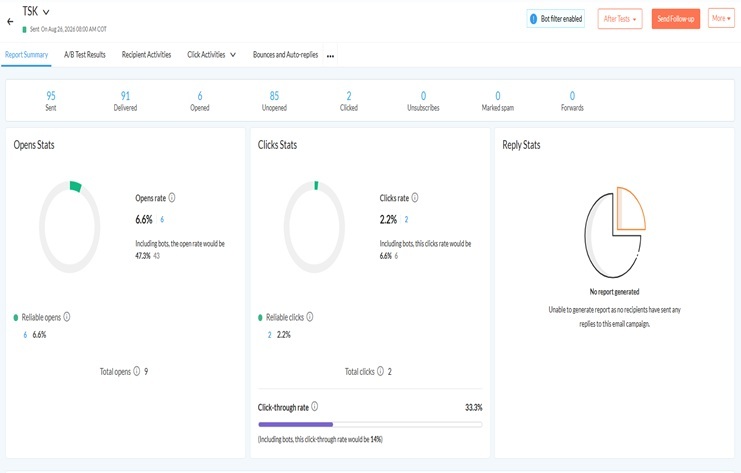
After the campaign was sent, here were my results:
| Metric | Result |
|---|---|
| Emails Sent | 95 |
| Delivered | 91 |
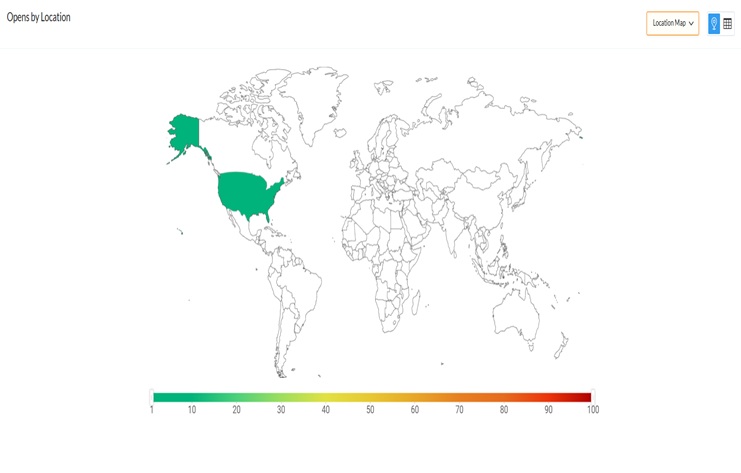
| Opens (Real Humans) | 6 |
| Clicks | 2 |
| Unsubscribes | 0 |
| Spam Complaints | 0 |
| Open Rate | 6.6% |
| Click Rate | 2.2% |
At first glance, these numbers seemed low. But I quickly realized this was normal for a campaign to a cold list. Industry benchmarks for cold outreach often fall in the 5–10% open rate range.
The most important number: 2 real people clicked. That means 2 real conversations started. That is not a failure.
The Real Challenge: Deliverability
The most frustrating part of my experience was discovering that emails were landing in spam folders for Gmail and Hotmail users.
Why This Happened
When I checked my test email in Outlook, I saw this warning:
“We can’t verify that this email came from the sender so it might not be safe to respond to it."
The sender address showed: the-name <exec@.online> via ztmail.psd.zsend.net
The problem: The “via” tag revealed that my email was being sent through a shared sending infrastructure (standard for many affordable email platforms). Because my domain was new and shared with other users on the same infrastructure, Microsoft’s spam filters couldn’t fully verify my identity yet.
The lesson: Shared IP addresses are a common trade-off on affordable plans. For higher-volume senders, a dedicated IP may improve deliverability. Zoho offers dedicated IPs on higher tiers — as do most platforms.
The Decision to Test Other Platforms
After researching the issue and running experiments, I decided to test other platforms to compare deliverability.
This is not a judgment on Zoho — every platform has trade-offs. The key is to test and choose what fits your volume and budget. Some platforms (like Mailchimp or MailerLite) may have stronger sender reputations for cold outreach in certain regions.
I documented my results and made an informed decision based on data, not frustration.
What I Learned: Key Takeaways for Freelancers
1. Start with a Clear Domain Strategy
- Buy a domain specifically for email marketing
- Use a cheap extension if you’re testing (like
.clickor.site) - Turn off auto-renew if you only need it for one year
2. Authentication Is Non-Negotiable
- SPF, DKIM, and DMARC records are mandatory for good deliverability
- Set them up correctly before sending your first campaign
- Use a DNS management tool that makes this easy (Namecheap’s Advanced DNS is excellent)
3. New Domains Need “Warming Up”
- Gmail, Outlook, and Yahoo treat new domains with suspicion
- Send small, personal emails first to build your reputation
- Get replies — they are the strongest positive signal to email providers
4. Shared IPs Can Hurt You (But Aren’t Always Bad)
- If you’re on a shared plan, your reputation is tied to other users
- For small senders, this is usually fine
- For high-volume senders, consider platforms that offer dedicated IPs
5. Low Open Rates Are Normal (At First)
- A 6.6% open rate is within the industry standard for cold outreach
- Don’t panic. Focus on clicks and replies, not just opens
6. Test, Test, Test
- Always send a test email to yourself before sending to your list
- Check how it looks in Gmail, Outlook, and mobile
- Use A/B test results to improve future campaigns
7. Know When to Pivot
- If a platform isn’t working for you, don’t be afraid to switch
- Document your experience and make an informed decision
A Note on Timing
Here’s a quick timeline of my journey:
| Week | What Happened |
|---|---|
| Week 1 | Domain registration, Zoho signup, DNS setup begins |
| Week 2 | DNS propagation, SPF/DKIM/DMARC configuration, first test email |
| Week 3 | Campaign sent, results collected, deliverability issues discovered |
| Week 4 | Research, testing other platforms, decision made |
Final Thoughts
Email marketing is not as simple as hitting “send.” It requires technical setup, patience, and a willingness to learn from failures.
This campaign wasn’t a failure. I got 2 clicks from real people who were interested in my services. I set up a professional email address and a working domain. I learned more in two weeks than I would have in a year of reading about email marketing.
If you’re a freelancer running an email campaign, remember: every expert was once a beginner who didn’t give up.
Disclaimer: This article reflects my personal experience with one specific campaign. Zoho Campaigns is a legitimate, widely-used platform. The deliverability challenges I faced were related to my new domain and cold-list outreach, not to Zoho itself. Always test your own setup before making decisions.
Frequently Asked Questions
Why did my emails land in spam?
New domains and shared sending IPs are treated with suspicion by Gmail, Outlook, and Hotmail. Build reputation gradually by sending small, personal emails first.
What are SPF, DKIM, and DMARC?
They are DNS records that authenticate your email, proving it was sent from a legitimate source. Without them, your emails are more likely to be marked as spam.
Is a 6.6% open rate good for cold email?
Yes — for cold outreach, 6.6% is within the industry standard range. Focus on clicks and replies, not just open rate.
Should I use a shared or dedicated IP?
Shared IPs are fine for small senders. If you send high volumes, a dedicated IP gives you more control and reputation.
How long does DNS propagation take?
Anywhere from 30 minutes to 48 hours. Most records propagate within a few hours.